📊 Portfolio Theme & Introduction
The main questions of my research are as follows: What exactly does product X do, what are its specific features? What steps should product X take in the future to maximize its key metrics and profits? To this end, I will conduct a superficial analysis of the product to get an overall picture, and delve a little deeper into individual parts to provide data-driven advice.
Visualization 1: Dashboard "Analysis of audience size, retention rate, and RFM analysis worldwide for product X"
- Which countries use our product the most? This question should show us where we should invest the most in marketing, and which countries have high potential due to their population size but do not use the product.
- How interested are users in our product, and how many of them actually continue to use it? If our retention rate is low, we should consider adding gamification or other tools to increase audience interest, otherwise our CAC will be too high, considering the users who have gone beyond registration.
- What is the distribution of the audience across RFM analysis segments? What is the revenue for each segment? Where is the greatest contrast and large audience coverage area? It is necessary to invest in transferring the audience between these two segments and adding features specifically for them.
The answers to these questions will enable you to optimize marketing campaign costs and allocate the savings to converting your audience across RFM segments using additional features to maximize profits.
- Why did you choose this chart type? Map is an easy choice to show the amount of users per country, since it uses visual memory of a user, and is easier than reading names of 100+ countries on a bar chart. Linear chart is mainly used to display trend over time, and that's exactly what retention rate is. Stacked bar chart in RFM analysis was used to replace area chart which showed the data incorectly, and helps with visualizing the quantitive amount of a metric at every date, by every segment.
- What visual encoding choices did you make (position, color, size, etc.)? In the map I used color encoding. The colors were chosen like that since we need both precise amount of users (so we can't use categorical colors pallete, which would require previous split into categories), but clearly show categories of countries: "very small amount of users", "medium amount", "the most". In the RFM analysis I also chose colors, but this time I needed categorical pallete to distinguish the RFM segments. Retention rate doesn't need any encodings
- What alternatives did you consider and why did you choose this approach? I also considered using area chart for RFM, but the problem was that it showed "phantom payments". When a segment made payments with the pause of 3 days, it still connected these points through dates when no payments were made. It was innacurete. With bar chart such problem is abscent.
- What are the strengths and tradeoffs of your choice? We can still clearly see the contrast between revenue and amount of users, but now it is precisely accurate

Main insights are: our main audience is Ukraine and US. Peru, Brazil and South Africa are close. We may look at the Asian region. China and India with their population are an easu choice for the next marketing campaign.
Our retention rate by activity is really low, 10% would be a healthy percentage. We need to work on maintaining the audience and look at the funnel to understand where we are loosing the most people.
Looking at our RFM analysis, we can understang that the most audience is still at the "New Customer" level, however, potential loyalists are making almost the same revenue. Of cource the contrast is bigger on champions or loyals, but if we invest on them -- we are covering very small amount of people. So my advice is to first of all make a customer potential loyalist. Maybe some bonuses from the first 2-3 payments.
📂 Data Source
[dataset is in the zip file]
Visualization 2: Gender and age distribution by country, and the dependence of the average check on gender and age distribution
- Which age group and gender should we focus on in our marketing campaign?
- Is there a correlation between % of people over 35 years and the AOV?
The answers to these two questions will optimize our marketing campaign once again, and give us interesting insights about where should we develop our product further, depending on our correlation.
- Why did you choose this chart type? Map is an easy choice to show the AOV per country, since it uses visual memory of a user, and is easier than reading names of 100+ countries on a bar chart. Scatter plot is mainly used for showing trends and correlation, which alligns perfectly with our task. Pie chart is used to show the percentage out of 100 for something. That's why it shows gender distribution. But why isn't it used in Age distribution? Because age groups are ordinal data, which is better be shown in the right order. Bar chart helps with that.
- What visual encoding choices did you make (position, color, size, etc.)? In the map I used color encoding. The colors were chosen like that since we need both precise AOV (so we can't use categorical colors pallete, which would require previous split into categories), but clearly show categories of countries: "very high AOV", "medium AOV", "small AOV". In the age distribution I also used color to distinguish genders, and used categorical palette. In the age group I chose to use sequential since it's not completely different categories, more like shades of one variable - age.
- What alternatives did you consider and why did you choose this approach? I also considered using pie chart for age distributoin, but text settings, color palette and easy-to-understand order would be hard to set up.
- What are the strengths and tradeoffs of your choice? We can easily see the correlation, set the minimum amount of orders to take into account, our colors on the map are adjusting to this filter, our distibutions are visually easu to understand.

📂 Data Source
[dataset is in the zip file]
Visualization 3: Churn Rate & Session Length Heatmap
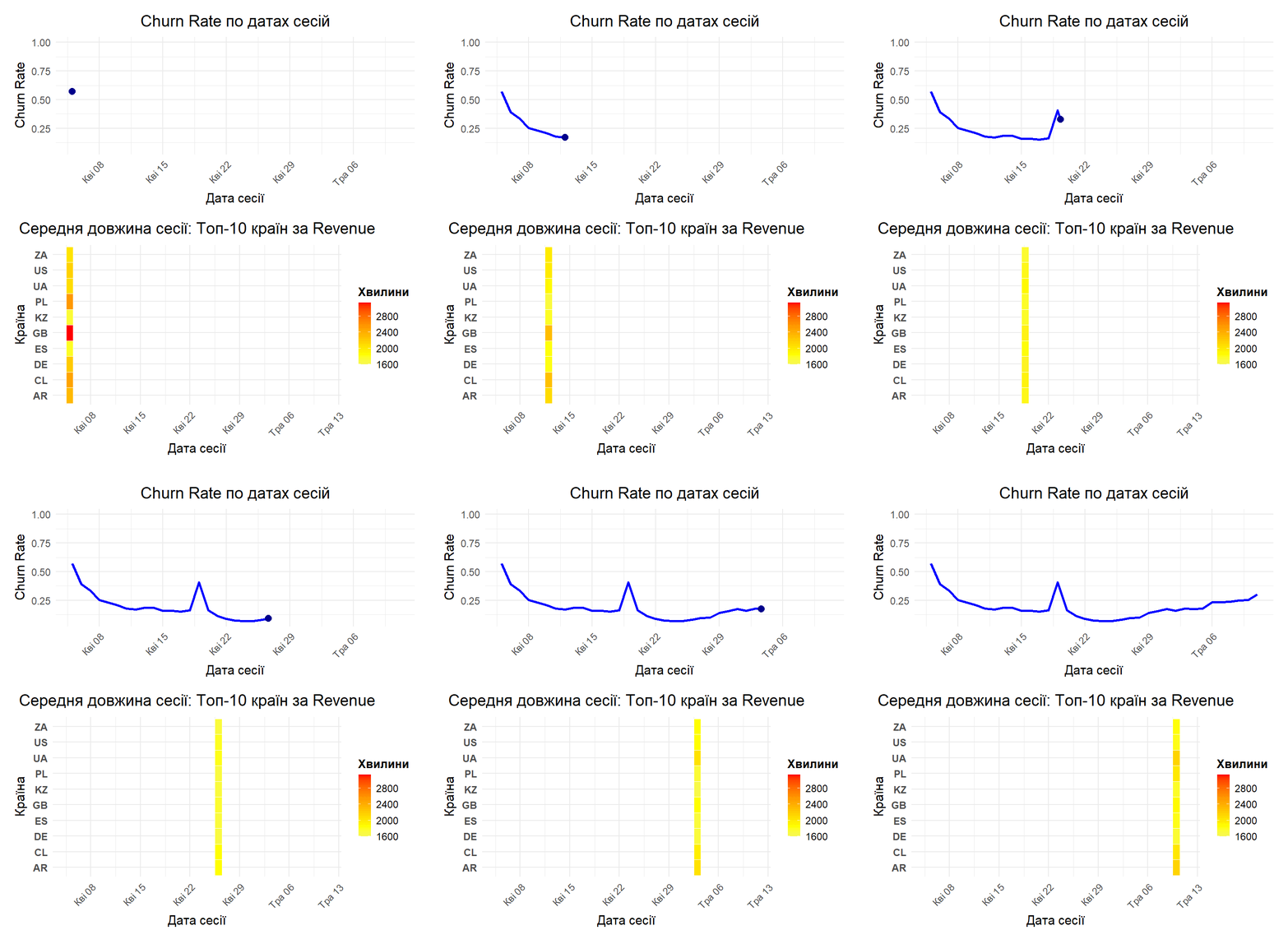
- What is our situation with the churn rate and how it's been over time?
- How does the churn rate affect average session duration?
- Were there any anomallies over time?
The answers to these questions will help us see the current situation of a product in terms of how many people are leaving the product, the trend over time, and anomalies which may tell us the story of latest updates of the product.
- Why did you choose this chart type? Lina chart is the best decision to show linear trends over time. Heatmap only shows top 10 countries by the total revenue to show the most statisticlly significant ststistics. And heatmap is used because line chart with 10 lines would be hard to understand.
- What visual encoding choices did you make (position, color, size, etc.)? Heatmap is encoded with sequential colors so the user can clearly see the differents in shades over time.
- What alternatives did you consider and why did you choose this approach? I also considered using line chart for session duration, but as I mentioned, it would overload the vizualization, and the "mean line" from these 10 countries wouldn't let us look at each country separately, because maybe the problem was in translation to a specific language or in any action that took place only in one country.
- What are the strengths and tradeoffs of your choice? We can easily see the change in shades with different churn rate and make our conclusions by the change in avg. session duration per country.
📂 Data Source
[dataset is in the zip file]
R Code Used for Visualization 3
library(tidyverse)
library(lubridate)
library(ggplot2)
library(gganimate)
library(gifski)
library(patchwork)
activities <- read_csv("C:/Users/Asus/Downloads/activities.csv")
activity_type_dict <- read_csv("C:/Users/Asus/Downloads/activity_type_dict.csv")
country_info_dict <- read_csv("C:/Users/Asus/Downloads/country_info_dict.csv")
feature_type_dict <- read_csv("C:/Users/Asus/Downloads/feature_type_dict.csv")
payments <- read_csv("C:/Users/Asus/Downloads/payments.csv")
registrations <- read_csv("C:/Users/Asus/Downloads/registrations.csv")
sessions <- read_csv("C:/Users/Asus/Downloads/sessions.csv")

head(activities)
head(sessions)
head(registrations)

data_merged <- registrations |>
  left_join(sessions, by = "user_id")

head(data_merged)
data_merged <- data_merged |>
  mutate(session_start_dt  = as.Date(session_start_dt ))

data_merged <- data_merged |>
  group_by(user_id) |>
  arrange(user_id, session_start_dt) |>
  mutate(
    diff_days = c(NA, diff(session_start_dt)),
    churn_flag = if_else(is.na(diff_days) | diff_days > 4, 1, 0)
  ) |>
  ungroup()

churn_rate <- data_merged |>
  group_by(session_start_dt) |>
  summarise(
    churn_rate = mean(churn_flag, na.rm = TRUE)
  )

head(churn_rate)


churn_rate <- data_merged |>
  group_by(session_start_dt) |>
  summarise(churn_rate = mean(churn_flag, na.rm = TRUE)) |>
  arrange(session_start_dt) |>
  mutate(frame_id = row_number())

animated_churn_rate <- ggplot(churn_rate, aes(x = session_start_dt, y = churn_rate)) +
  geom_line(aes(group = 1), color = "blue", size = 1) +
  geom_point(color = "darkblue", size = 3) +
  labs(
    title = "Churn Rate по датах сесій",
    x = "Дата сесії",
    y = "Churn Rate"
  ) +
  theme_minimal() +
  theme(axis.text.x = element_text(angle = 45, hjust = 1)) +
  transition_reveal(frame_id) +
  ease_aes('linear')

anim <- animate(
  animated_churn_rate,
  renderer = gifski_renderer(),
  nframes = 100,
  fps = 10,
  width = 800,
  height = 600,
  end_pause = 10
)

anim

avg_session_length <- data_merged |>
  filter(!is.na(duration)) |>
  group_by(session_start_dt) |>
  summarise(avg_session_length = mean(duration, na.rm = TRUE)) |>
  arrange(session_start_dt) |>
  mutate(frame_id = row_number())

p2 <- ggplot(avg_session_length, aes(x = session_start_dt, y = avg_session_length)) +
  geom_line(aes(group = 1), color = "darkgreen", size = 1) +
  geom_point(color = "green", size = 3) +
  labs(
    title = "Середня довжина сесії по датах",
    x = "Дата сесії",
    y = "Середня довжина (хв)"
  ) +
  theme_minimal() +
  theme(axis.text.x = element_text(angle = 45, hjust = 1)) +
  transition_reveal(frame_id) +
  ease_aes('linear')

combined_plot <- anim / p2

anim_combined <- animate(
  combined_plot,
  renderer = gifski_renderer(),
  nframes = 100,
  fps = 10,
  width = 800,
  height = 1000,
  end_pause = 10
)

anim_combined


churn_rate_long <- churn_rate |>
  mutate(metric = "Churn Rate",
         value = churn_rate)

avg_session_long <- avg_session_length |>
  mutate(metric = "Середня довжина сесії (хв)",
         value = avg_session_length)

combined_data <- bind_rows(
  churn_rate_long |> select(session_start_dt, frame_id, metric, value),
  avg_session_long |> select(session_start_dt, frame_id, metric, value)
)

animated_combined <- ggplot(combined_data, aes(x = session_start_dt, y = value)) +
  geom_line(aes(group = 1, color = metric), size = 1) +
  geom_point(aes(color = metric), size = 3) +
  facet_wrap(~ metric, ncol = 1, scales = "free_y") +
  labs(
    title = "Метрики по датах сесій",
    x = "Дата сесії",
    y = "Значення"
  ) +
  scale_color_manual(values = c("Churn Rate" = "blue",
                                "Середня довжина сесії (хв)" = "darkgreen")) +
  theme_minimal() +
  theme(
    axis.text.x = element_text(angle = 45, hjust = 1),
    legend.position = "none"
  ) +
  transition_reveal(frame_id) +
  ease_aes('linear')

anim_combined <- animate(
  animated_combined,
  renderer = gifski_renderer(),
  nframes = 100,
  fps = 10,
  width = 1280,
  height = 1000,
  end_pause = 10
)
library(av)
anim_combined
anim_save("combined_animation.gif", animation = anim_combined, path = "C:/Users/Asus/Downloads", renderer = gifski_renderer())


library(magick)
p1 <- ggplot(churn_rate, aes(x = session_start_dt, y = churn_rate)) +
  geom_line(aes(group = 1), color = "blue", size = 1.5) +
  geom_point(color = "darkblue", size = 4) +
  labs(
    title = "Churn Rate по датах сесій",
    x = "Дата сесії",
    y = "Churn Rate"
  ) +
  theme_minimal(base_size = 16) +
  theme(
    plot.title = element_text(size = 22, face = "bold", hjust = 0.5),
    axis.title = element_text(size = 18, face = "bold"),
    axis.text.x = element_text(size = 14, angle = 45, hjust = 1),
    axis.text.y = element_text(size = 14),
    plot.margin = margin(20, 20, 10, 20)
  ) +
  transition_reveal(frame_id) +
  ease_aes('linear')

top_countries_revenue <- data_merged |>
  left_join(payments, by = "user_id") |>
  filter(!is.na(amount_usd)) |>
  group_by(country_code) |>
  summarise(total_revenue = sum(amount_usd, na.rm = TRUE)) |>
  arrange(desc(total_revenue)) |>
  slice(1:10) |>
  pull(country_code)

heatmap_data <- data_merged |>
  filter(country_code %in% top_countries_revenue,
         !is.na(duration))  |>
  group_by(country_code, session_start_dt) |>
  summarise(avg_session_length = mean(duration, na.rm = TRUE),
            .groups = 'drop')

p2 <- ggplot(heatmap_data, aes(x = session_start_dt, y = country_code, fill = avg_session_length)) +
  geom_tile(color = "white", size = 0.5) +
  scale_fill_gradient2(low = "lightblue", mid = "yellow", high = "red",
                       midpoint = median(heatmap_data$avg_session_length, na.rm = TRUE),
                       name = "Хвилини") +
  labs(
    title = "Середня довжина сесії: Топ-10 країн за Revenue",
    x = "Дата сесії",
    y = "Країна"
  ) +
  theme_minimal(base_size = 16) +
  theme(
    plot.title = element_text(size = 22, face = "bold", hjust = 0.5),
    axis.title = element_text(size = 18, face = "bold"),
    axis.text.x = element_text(size = 14, angle = 45, hjust = 1),
    axis.text.y = element_text(size = 14, face = "bold"),
    legend.title = element_text(size = 16, face = "bold"),
    legend.text = element_text(size = 14),
    plot.margin = margin(10, 20, 20, 20)
  ) +
  transition_time(session_start_dt) +
  ease_aes('linear')

anim1 <- animate(
  p1,
  renderer = gifski_renderer(),
  nframes = 100,
  fps = 10,
  width = 1000,
  height = 500,
  res = 120
)

anim2 <- animate(
  p2,
  renderer = gifski_renderer(),
  nframes = 100,
  fps = 10,
  width = 1000,
  height = 600,
  res = 120
)

anim_save("temp_churn.gif", anim1)
anim_save("temp_heatmap.gif", anim2)

churn_gif <- image_read("temp_churn.gif")
heatmap_gif <- image_read("temp_heatmap.gif")

combined_gif <- image_append(c(churn_gif[1], heatmap_gif[1]), stack = TRUE)
for(i in 2:100){
  combined <- image_append(c(churn_gif[i], heatmap_gif[i]), stack = TRUE)
  combined_gif <- c(combined_gif, combined)
}

image_write(combined_gif, "combined_churn_heatmap.gif")

combined_gif

file.remove("temp_churn.gif")
file.remove("temp_heatmap.gif")


n_frames_churn <- length(churn_gif)
n_frames_heatmap <- length(heatmap_gif)
n_frames <- min(n_frames_churn, n_frames_heatmap)

cat("Кількість кадрів у churn_gif:", n_frames_churn, "\n")
cat("Кількість кадрів у heatmap_gif:", n_frames_heatmap, "\n")
cat("Використовуємо кадрів:", n_frames, "\n")

combined_gif <- image_append(c(churn_gif[1], heatmap_gif[1]), stack = TRUE)

for(i in 2:n_frames){
  combined <- image_append(c(churn_gif[i], heatmap_gif[i]), stack = TRUE)
  combined_gif <- c(combined_gif, combined)
}

image_write(combined_gif, path = "C:/Users/Asus/Downloads/combined_churn_heatmap1.gif")

combined_gif

file.remove("temp_churn.gif")
file.remove("temp_heatmap.gif")
🔎 Final Conclusions
Looking at all the data together, Product X is best described as a streaming service.
Activities include likes, comments, and at the same time, people can pay (different amount of money), and get different statuses (vip, premium). It looks like twitch (but without live streams, because then comments would make up most of activities) with the internal contribution function (bits are horrible)
The audience is clearly male-dominated, with the strongest group being men aged 35+. Older users spend more, stay longer, and drive most of the revenue.
RFM results show that many users are still new, while potential loyalists already bring in almost as much revenue as top segments. This means the biggest opportunity is not chasing new users, but turning new users into regular viewers.
Product lost a big part of the trust at April 19, and now we have to rebuild it again. Very important: product must hold A/B test before adding a new feature or change design, to avoid such mistakes.
Taken together, the data strongly suggests that Product X is a streaming service focused on topics primarily interesting to men. The smartest next steps are to protect trust, hold A/B tests to avoid disruptive changes, and invest in content and incentives that move users toward habitual use. Marketing campaigns must be focused on Asian region, US, Ukraine, and Latin America (most potential + already make up most of the audience).